
Overview
The SeggWat n8n node allows you to automate feedback workflows in n8n, the popular workflow automation platform. With this integration, you can:
- Auto-triage feedback: Route bug reports to developers, feature requests to product managers
- Alerting: Get notified when page ratings drop below a threshold
- Reporting: Generate weekly feedback summaries and send them via email or Slack
- Data sync: Push feedback to other tools like Linear, Jira, or Notion
- Bulk operations: Update feedback statuses in batch based on conditions
Prerequisites
Before you start, ensure you have:
- An n8n instance (self-hosted or n8n Cloud)
- A SeggWat account with at least one project
- An Organization Access Token (API key) - see Authentication
Installation
Install the Community Node
In your n8n instance, go to Settings → Community Nodes and search for n8n-nodes-seggwat. Click Install.
Alternatively, for self-hosted n8n, install via npm:
npm install n8n-nodes-seggwatCreate API Credentials
- Log in to your SeggWat Dashboard
- Go to Settings → API Tokens
- Click Create New Token and label it "n8n Integration"
- Copy the token immediately (it won't be shown again)
Add Credentials in n8n
- In n8n, go to Credentials → Add Credential
- Search for "SeggWat API"
- Enter your API key
- Optionally set a custom API URL (default:
https://seggwat.com) - Click Save
Never commit API tokens to version control. Use n8n's credential system to securely store your API key.
Available Operations
The SeggWat node provides two resources: Feedback and Rating, each with multiple operations.
Feedback Operations
| Operation | Description |
|---|---|
| Submit | Create new feedback programmatically |
| List | Retrieve feedback with filtering, sorting, and pagination |
| Get | Fetch a single feedback item by ID |
| Update | Modify feedback message, type, or status |
| Delete | Remove a feedback item |
Rating Operations
| Operation | Description |
|---|---|
| Submit | Create a new rating (helpful/not helpful) |
| List | Retrieve ratings with optional filters |
| Get | Fetch a single rating by ID |
| Get Statistics | Retrieve aggregated rating metrics |
| Delete | Remove a rating |
Common Use Cases
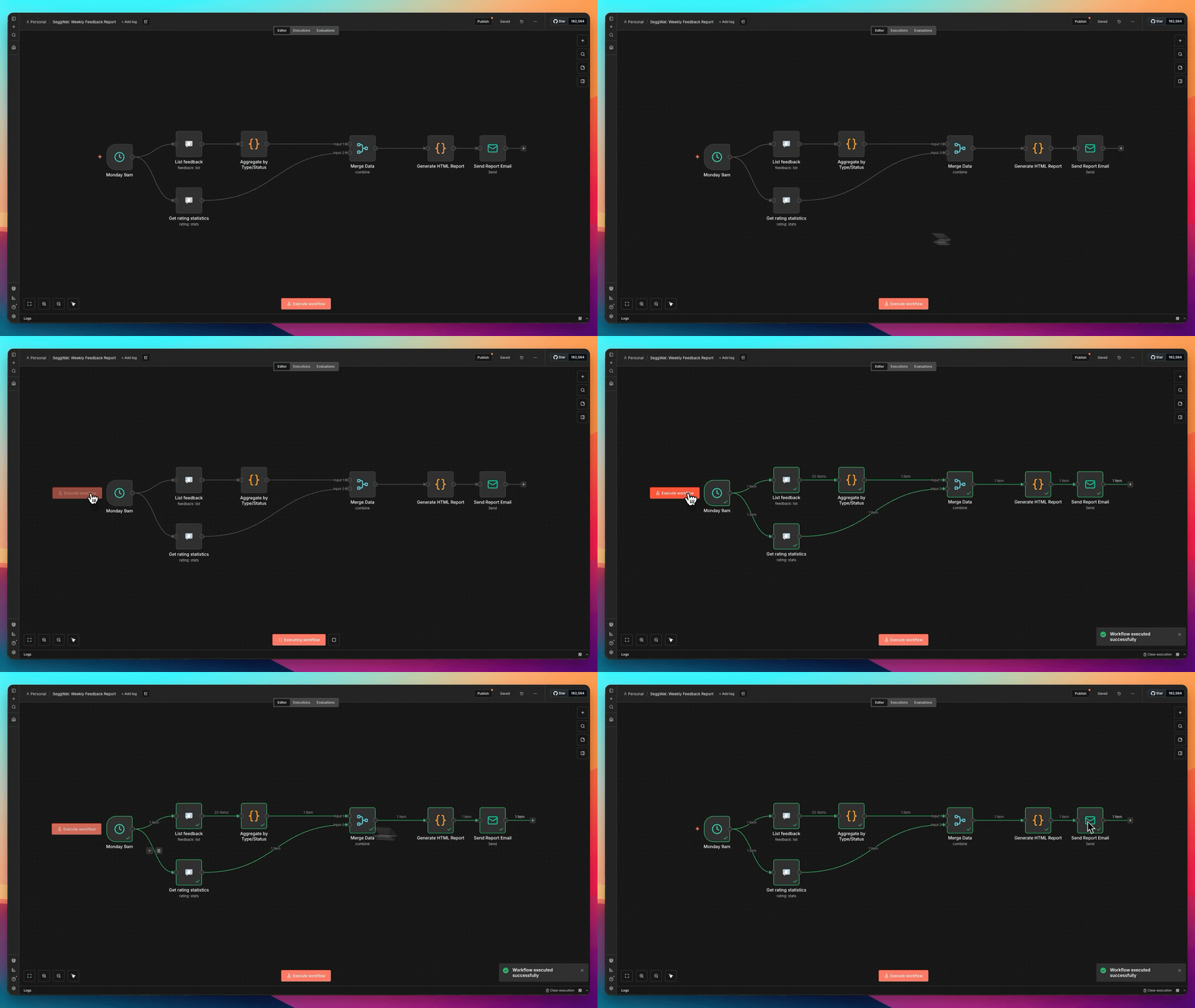
Weekly Feedback Summary
Send a weekly digest of feedback activity.
Add Schedule Trigger
Configure a Schedule Trigger node to run weekly (e.g., every Monday at 9 AM).
Fetch Feedback
Add a SeggWat node with:
- Resource: Feedback
- Operation: List
- Return All: true
- Sort by: created_at (descending)
Aggregate Data
Use a Code node to summarize the feedback:
const feedback = $input.all();
const byType = {};
const byStatus = {};

for (const item of feedback) {
  byType[item.json.type] = (byType[item.json.type] || 0) + 1;
  byStatus[item.json.status] = (byStatus[item.json.status] || 0) + 1;
}

return [{
  json: {
    total: feedback.length,
    byType,
    byStatus,
    weekStart: new Date(Date.now() - 7 * 24 * 60 * 60 * 1000).toISOString()
  }
}];Send Report
Add an Email or Slack node to send the summary to your team.
Low Rating Alert
Get notified when a page's rating drops below a threshold.
Schedule Check
Add a Schedule Trigger to run hourly.
Get Rating Stats
Add a SeggWat node:
- Resource: Rating
- Operation: Get Statistics
- Project ID: your project
- Path filter:
/docs/getting-started(optional, for specific pages)
Check Threshold
Add an IF node:
- Condition:
{{ $json.helpful_percentage }}is less than70
Send Alert
On the true branch, send a notification:
Node Configuration Reference
Feedback List Options
| Parameter | Description |
|---|---|
| Project | Select from your available projects |
| Status Filter | New, Active, Assigned, Hold, Closed, Resolved |
| Type Filter | Bug, Feature, Praise, Question, Improvement, Other |
| Search | Full-text search in feedback messages |
| Sort By | created_at or updated_at |
| Sort Order | Ascending or descending |
| Limit | Max items per page (1-100) |
| Return All | Fetch all pages automatically |
| Simplify | Return only essential fields |
Feedback Submit Options
| Parameter | Description | Required |
|---|---|---|
| Project | Target project | Yes |
| Message | Feedback content | Yes |
| Path | Page URL where feedback originated | No |
| Version | App version string | No |
| Source | Widget, Manual, or custom | No |
| Submitted By | User identifier | No |
Rating Statistics Options
| Parameter | Description |
|---|---|
| Project | Target project |
| Path | Filter stats for a specific page path |
Returns:
total- Total number of ratingshelpful_count- Number of helpful (thumbs up) ratingsnot_helpful_count- Number of not helpful (thumbs down) ratingshelpful_percentage- Percentage of helpful ratings
Filtering and Pagination
Filter Feedback by Multiple Criteria
Combine filters to narrow down results:
{
  "resource": "feedback",
  "operation": "list",
  "filters": {
    "status": "New",
    "type": "Bug",
    "search": "login error"
  },
  "sort": {
    "field": "created_at",
    "order": "desc"
  },
  "pagination": {
    "limit": 50,
    "returnAll": false
  }
}
Paginate Large Datasets
For projects with many feedback items:
- Set Return All to
trueto automatically fetch all pages - Or set a Limit (max 100) and handle pagination manually with the Page parameter
Simplified Output
Enable Simplify Output to receive only essential fields:
Full output:
{
  "id": "abc123",
  "message": "The login button doesn't work",
  "type": "Bug",
  "status": "New",
  "path": "/login",
  "version": "1.2.3",
  "source": "Widget",
  "submitted_by": "user@example.com",
  "created_at": "2024-01-15T10:30:00Z",
  "updated_at": "2024-01-15T10:30:00Z",
  "project_id": "project-uuid",
  "organization_id": "org-uuid",
  "_id": "mongo-id"
}
Simplified output:
{
  "id": "abc123",
  "message": "The login button doesn't work",
  "type": "Bug",
  "status": "New",
  "path": "/login",
  "version": "1.2.3",
  "source": "Widget",
  "submitted_by": "user@example.com",
  "created_at": "2024-01-15T10:30:00Z"
}
Error Handling
The node provides clear error messages for common issues:
| Error | Cause | Solution |
|---|---|---|
| Connection refused | n8n can't reach SeggWat API | Check network/firewall settings |
| Host not found | Invalid API URL | Verify the API URL in credentials |
| 401 Unauthorized | Invalid or expired API key | Generate a new API key |
| 403 Forbidden | API key lacks permission | Check organization membership |
| 404 Not Found | Invalid project or item ID | Verify the ID exists |
Add an Error Trigger node to catch and handle failures gracefully:
// In Error Trigger workflow
const error = $input.first().json;

return [{
  json: {
    message: `SeggWat workflow failed: ${error.message}`,
    workflow: error.workflow.name,
    timestamp: new Date().toISOString()
  }
}];
Best Practices
Troubleshooting
Credential Test Fails
- Verify your API key is correct (starts with
oat_) - Check if the API key has been revoked in the dashboard
- Ensure the API URL doesn't have a trailing slash
No Projects in Dropdown
- Confirm your API key belongs to an organization with projects
- Check that your user has access to the projects
Empty Results
- Verify the project has feedback/ratings
- Check if filters are too restrictive
- Try removing filters to confirm data exists