
Send feedback with an annotated screenshot from any tab.
The SeggWat Chrome extension puts a feedback button in the corner of every webpage you touch. Capture, annotate, send — no copy-pasting URLs, no switching tabs, no third-party screenshot tools.
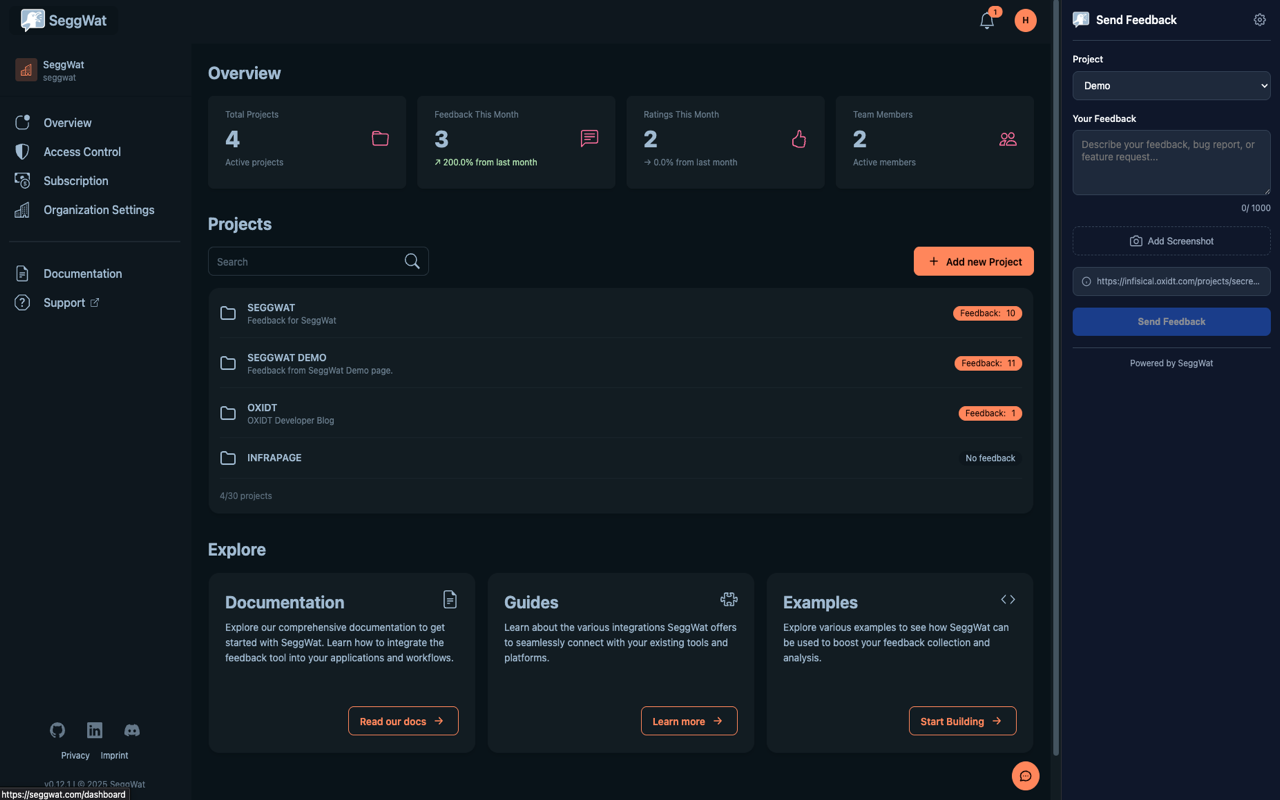
Capture feedback the moment you spot it.
The extension is for the work you do across other people's sites — staging environments, customer dashboards, marketing pages, internal tools. One click to log a bug, an idea, or a piece of praise without leaving the page.
One-click submission
Open the popup, pick a project, type your message, hit send. The current URL, title, and browser metadata are attached automatically — no manual copy-paste.
Screenshot annotation
Capture the visible viewport and mark it up with arrows, rectangles, text, freehand pen, and blackout tools. Redact sensitive data before submitting.
Side panel mode
Keep the feedback form pinned in the side panel while you browse. Perfect for QA sessions where you're logging multiple issues without losing context.
Right-click menu
Right-click anywhere on a page to open "Send feedback to SeggWat". Faster than reaching for the toolbar icon, especially on long-form pages.
Per-domain projects
The extension remembers which SeggWat project you last used on each domain. Submitting feedback from staging.acme.com always defaults to the right project.
Multi-project, multi-org
Switch between organizations and projects from the popup. Agency teams managing multiple clients can route feedback to the correct project in one dropdown.
API key auth
Sign in once with your SeggWat API key (oat_… token). Stored only in chrome.storage on your device — never synced to third parties.
Manifest V3
Built on Chrome's modern extension platform with a service worker, side_panel API, and minimal permissions. No long-lived background pages, no spyware.
Hosted in the EU
Same backend as the dashboard and iOS app: GDPR-compliant, EU-hosted, no tracking cookies. Your feedback never leaves the European Union.
Pick the workflow that fits your day.
The extension exposes three entry points so you can hit the one that matches what you're doing — quick comment, focused QA pass, or a screenshot-heavy bug report.
Quick one-off feedback.
Click the toolbar icon, type a message, send. Ideal for capturing the small thoughts that would otherwise get lost — "this button is confusing", "add a tooltip here".
QA mode.
Pin the side panel during a testing session. Walk the product, log every issue you find without ever losing your place — the page stays exactly where it was.
Bug reports that explain themselves.
Capture, circle the broken element, redact the customer email in the screenshot, send. A 10-second screenshot saves a 10-minute thread reconstructing what you saw.
The feedback widget is for users. The extension is for your team.
Your embedded SeggWat widget is the channel customers use to talk to you. The extension is the channel you use to talk back — about staging builds, marketing pages, internal tools, competitor sites, anything you can load in a tab. The friction of "open dashboard, find project, copy URL, attach screenshot" disappears.
Engineers, designers, support leads, founders — anyone doing QA across multiple environments — stop dropping feedback into Slack threads and start logging it where it can actually be triaged.
Works on sites you don't own
Test a competitor's UX. Review a customer's deployment. Audit a vendor's flow. The widget can't be embedded everywhere — the extension can.
Screenshots without third-party tools
No more switching to a screenshot app, saving a file, dragging it into a form. Capture and annotate in-context, attach in one click.
Faster than the dashboard
Submitting feedback through the dashboard means navigation, project picking, copy-pasting the URL. The extension turns that into three keystrokes.
Stays in sync with everything else
Same backend as the dashboard and iOS app. Feedback you log from the extension shows up in the inbox immediately, with the originating URL and your screenshot attached.
From Chrome Web Store to first submission in under a minute.
Install the extension
Add SeggWat Feedback from the Chrome Web Store. Free for every SeggWat customer — no separate license, no add-on cost.
Paste your API key
Generate an API key in your SeggWat dashboard settings and paste it into the extension options page. Test connection loads your projects automatically.
Send feedback from anywhere
Click the toolbar icon (or right-click → Send feedback), pick a project, type your message, optionally attach an annotated screenshot, and submit.
Hand out a scoped key, not the keys to the kingdom.
When a beta tester, contractor, or external QA partner needs the extension, you don't want to mint them a full-access API key. Use the Tester preset in Settings → API Tokens to generate a key that can submit feedback on one project and nothing else.
The preset is the minimum scope required for the extension to work — list projects, submit feedback. No reads of past feedback, no access to other projects in the org, and a 90-day default expiry so forgotten keys don't linger.
Tester preset docsproject:listList the one project the key is restricted to (the extension needs this to populate its project picker)feedback:writeSubmit new feedback to that one project
What it cannot do
- —Read existing feedback or ratings
- —Access other projects in the org
- —Modify, status-change, or delete anything
- —Outlive its expiry (default 90 days)
In the extension
The extension's Test Connection screen reads the scope of whatever key you paste in and shows the tester exactly what they can and can't do — so they know up front whether the project picker will be empty, whether feedback submission will work, and whether the key is restricted to a single project.
Common questions about SeggWat for Chrome
Is the SeggWat Chrome extension free?
Yes. The extension is free for every SeggWat customer on every plan, including the 14-day free trial. There is no separate license or per-seat charge for the browser extension.
Does it work in Microsoft Edge or other Chromium browsers?
Yes. The extension targets Chrome 114+ but installs and works in Microsoft Edge, Brave, Arc, Vivaldi, and any other Chromium-based browser that supports Manifest V3 extensions from the Chrome Web Store.
Is there a Firefox or Safari version?
Not yet. The Manifest V3 build runs on Chromium browsers today. Firefox MV3 support is on the roadmap once the side_panel API stabilizes there. Safari is further out — the iOS app handles the Apple ecosystem in the meantime.
What permissions does the extension request?
activeTab (capture screenshots of the current tab), storage (store your API key and project preferences locally), tabs (read the current page URL and title), contextMenus (the right-click "Send feedback" item), and sidePanel (the always-visible side panel mode). It only talks to seggwat.com.
Where is my API key stored?
Your API key lives in chrome.storage on your device only. It is never synced through Google's account sync, never shared with third parties, and never embedded in screenshots. You can rotate it from the SeggWat dashboard at any time.
Can I give external testers a limited API key?
Yes. Use the "Tester preset" when creating an API key in Settings → API Tokens. It grants only the two scopes the extension needs (project:list, feedback:write), restricts the key to a single project, and expires after 90 days by default. External testers get a working extension without seeing past feedback, other projects, or any read/write surface beyond submission.
How does Test Connection know what my token can do?
When you click Test Connection, the extension calls GET /api/v1/projects with your key. The response includes the granted scopes and project restrictions, which the extension renders as labelled chips so testers can see at a glance whether their key allows submission, listing, and which project(s) it covers.
Can I capture full-page screenshots, not just the viewport?
The current version captures the visible viewport (what's on screen). Full-page scrolling capture is on the roadmap. For long pages, scroll to the area you want to report on and capture there — the URL and scroll position are attached automatically.
Does it work on internal tools and staging environments?
Yes. The extension works on any URL that loads in Chrome, including localhost, *.staging.acme.com, internal admin panels, and customer-hosted deployments. The per-domain project memory means each environment defaults to the right SeggWat project.
Where does the extension send feedback?
All feedback is submitted to the same EU-hosted SeggWat API as the dashboard and iOS app. The extension makes no requests to any other host. No analytics, no third-party trackers, no telemetry.
Send feedback from any tab.
Free with every SeggWat plan. Built on Manifest V3 for Chrome, Edge, and every Chromium browser.
Share this page