
Triage customer feedback from your iPhone.
The native SeggWat iOS app puts your feedback inbox, ideas, and customer signals in your pocket. Review submissions, change status, and stay on top of users — anywhere, on the move, between meetings.
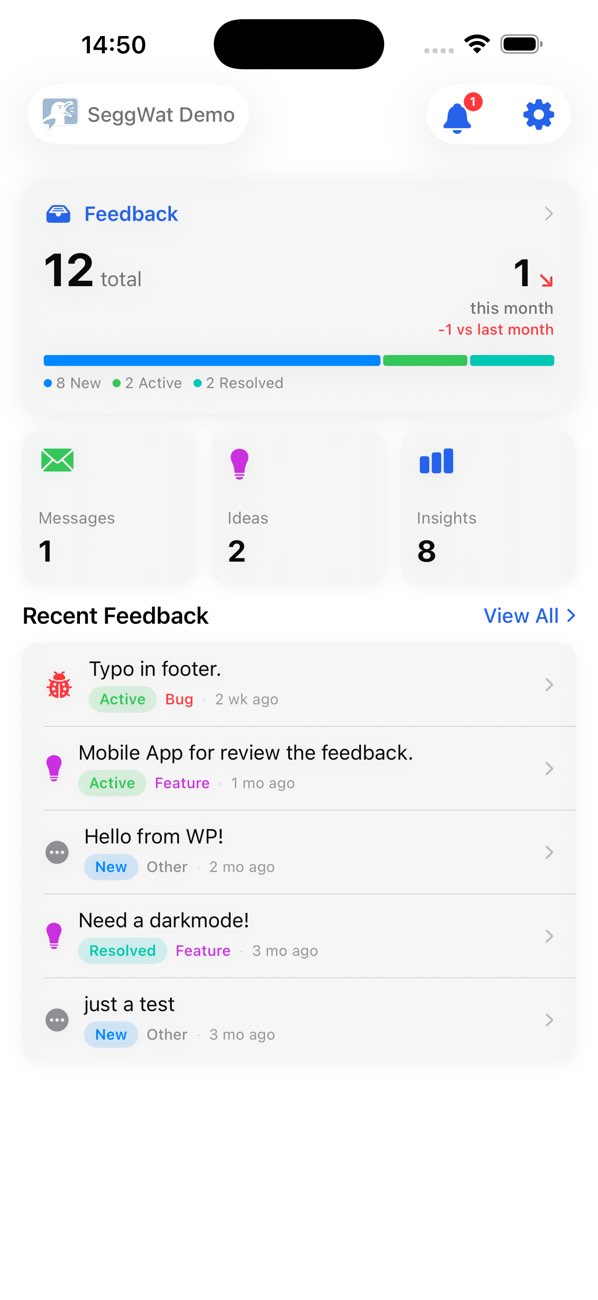
Everything you need to clear the inbox between meetings.
The iOS app focuses on the workflow you actually run on a phone: skim, decide, respond, archive. Heavy lifting like project setup and analytics stays on the dashboard — the phone is for moving fast.
Realtime feedback inbox
Every new piece of feedback lands instantly with status badges, source tags, and the original message. Sort by status, type, or project across your entire organization.
Push notifications
Get pinged the moment a critical bug or new idea comes in. Configure per-project filters so quiet projects stay quiet and noisy ones get your attention.
Swipe-to-triage
Swipe right to mark active, left to close, long-press to assign or change status. The whole inbox is built around one-handed thumb gestures, not desktop menus.
Status and assignment
Move feedback through New → Active → Assigned → Hold → Resolved without breaking flow. Assign teammates, change types (Bug, Feature, Praise), or write internal notes inline.
Feature requests
Review upvoted feature requests, change roadmap state (Planned, In Progress, Completed), and respond to your most engaged customers — straight from your phone.
Multi-project, multi-org
Switch between organizations and projects with a tap. Aggregate or filter inbox views, useful for agencies and teams managing several products.
Secure by default
Authenticate with your SeggWat account or biometric unlock (Face ID / Touch ID). Tokens stored in the iOS Keychain, never in plain storage.
Native Swift, iOS 17+
Built in Swift 6 with SwiftUI and the modern Observation framework. Smooth scrolling, dark mode, dynamic type, and proper iPad layouts — no web wrapper.
Hosted in the EU
Same backend as the dashboard: GDPR-compliant, EU-hosted, no tracking cookies. Your feedback never leaves the European Union.
Designed for the way iPhone users actually work.
The dashboard is the place to set things up — projects, integrations, automations. The iOS app is where you run the day. Two surfaces, one inbox, perfectly synced.
Skim and decide.
Your full feedback queue, grouped by status, with rich previews. Tap to read the full message, screenshot, and customer context.
Decide without scrolling forever.
One tap reveals everything: page URL, version, attachments, customer history, and the actions you actually need — change status, assign, archive.
Quiet by default.
Granular per-project notification rules so you only get pinged for the things that matter. Mute a chatty project for a weekend with one tap.
Mobile feedback triage shouldn't feel like a browser tab.
The dashboard works fine in a mobile browser — but a native app changes the speed at which you can clear an inbox. Push notifications arrive instantly. Gestures feel right. The app remembers where you left off. And you can triage from the lock screen, in a coffee shop, between two stops on the train.
Founders, support leads, and product managers tell us they actually read feedback now — because it's two taps away, not buried in a bookmark.
Push notifications, not email digests
Real-time pings for the projects and types you care about — bugs, ideas, low NPS scores. Unsubscribe noise per project.
Built for thumbs
Swipe gestures, large hit targets, biometric unlock. The whole UI is laid out for one-handed use on a phone, not adapted from a desktop.
Offline-tolerant
Open feedback you've already seen even on a flaky connection. Status changes queue and sync the moment you're back online.
Stays in sync with the dashboard
Same data, same projects, same statuses. Hand off a piece of feedback to a teammate on the dashboard and they'll see your latest state immediately.
From App Store to first triage in under two minutes.
Download the app
Install SeggWat from the App Store. Free for every SeggWat customer — no separate license, no add-on cost.
Sign in
Use your existing SeggWat account. Face ID or Touch ID unlocks subsequent visits — no re-typing passwords.
Triage from anywhere
Pick a project, swipe through new feedback, change statuses, and respond. Notifications keep you in the loop without checking the app.
Common questions about SeggWat for iOS
Is the SeggWat iOS app free?
Yes. The iOS app is free for every SeggWat customer on every plan, including the 14-day free trial. There is no separate license or per-seat charge for the mobile app.
What iOS version do I need?
SeggWat for iOS requires iOS 17 or later and runs natively on iPhone and iPad. It is built in Swift 6 with SwiftUI and uses the modern Observation framework.
Does the iOS app support push notifications?
Yes. You'll get a push notification every time new feedback is submitted to one of your projects. Notification rules are configurable per project so quiet projects don't generate noise.
Can I change feedback status from the app?
Yes. You can move feedback through every status (New, Active, Assigned, Hold, Resolved, Closed), change feedback type, assign teammates, and write internal notes — everything you can do on the web dashboard for an individual feedback item.
Does it work for teams?
Yes. The app respects organization roles (Owner, Admin, Member) and shows feedback across every project you have access to. Status changes you make sync immediately to the dashboard for your teammates.
Is there an Android version?
Not yet. The dashboard works in any mobile browser — including Chrome on Android — and we plan to evaluate native Android once iOS adoption is mature. Subscribe to the changelog for updates.
Where does the app store data?
All data lives on the same EU-hosted SeggWat backend as the dashboard. The app stores only an authentication token in the iOS Keychain and a small local cache for offline reads. No analytics, no third-party trackers.
Triage feedback on the move.
Free with every SeggWat plan. Built natively in Swift for iPhone and iPad.
Share this page